Working through a Remote ‘Bastion’ or ‘Jump’ Host
In the case the Broker Services are running in a private & secured subnet, using a bastion host as an indirection may provide a solution.
Here, we explore the following setup and how the inventory and playbooks using Ansible Solace may be structured to support this setup:
2 or more VPCs running Broker Services, both with a
Bastion Host- either self-hosted (Figure 1) or with Solace Cloud (Figure 2)configured from a single point, the
Ansible Controller
The flow inside a playbook is as follows:
Ansible logs into the
Bastion Hostvia ssh (e.g. using a private key)Ansible transfers the
Solace moduleto theBastion Hostand executes it therethe
Solace modulerunning on theBastion Hostuses HTTPS to communicate via SEMP with the individualBroker Service Instancesthe
Solace modulewrites it’s log files to a defined directory on theBastion Hostafter successful execution and in case of any errors, the
log filesare transferred back to theAnsible Controller
This mechanism also allows for the creation of bridges & DMR clusters between Broker Service Instances across VPCs - using the same playbook.
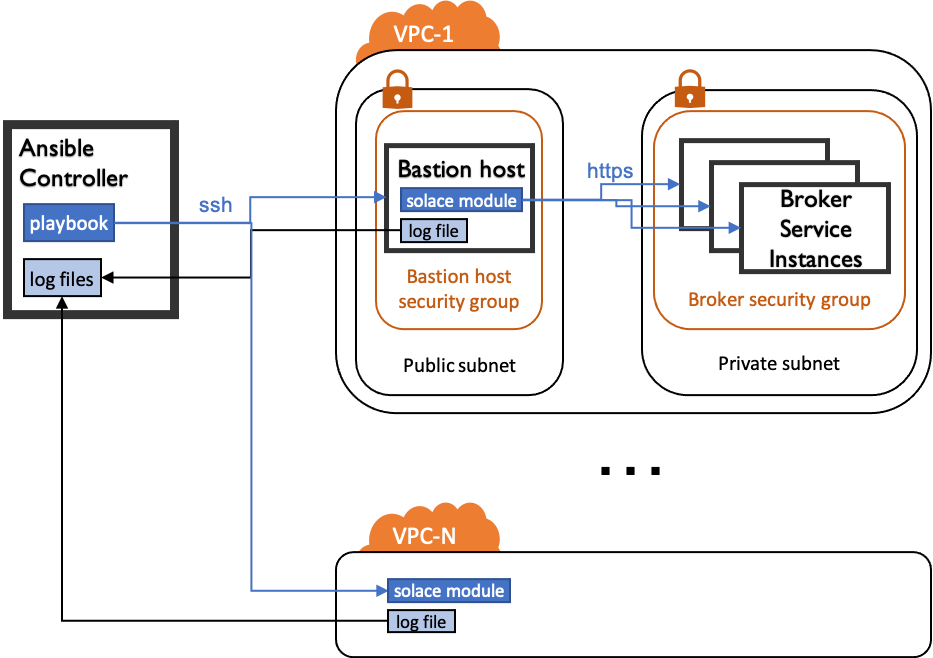
Figure 1: Setup with self-hosted Broker Services
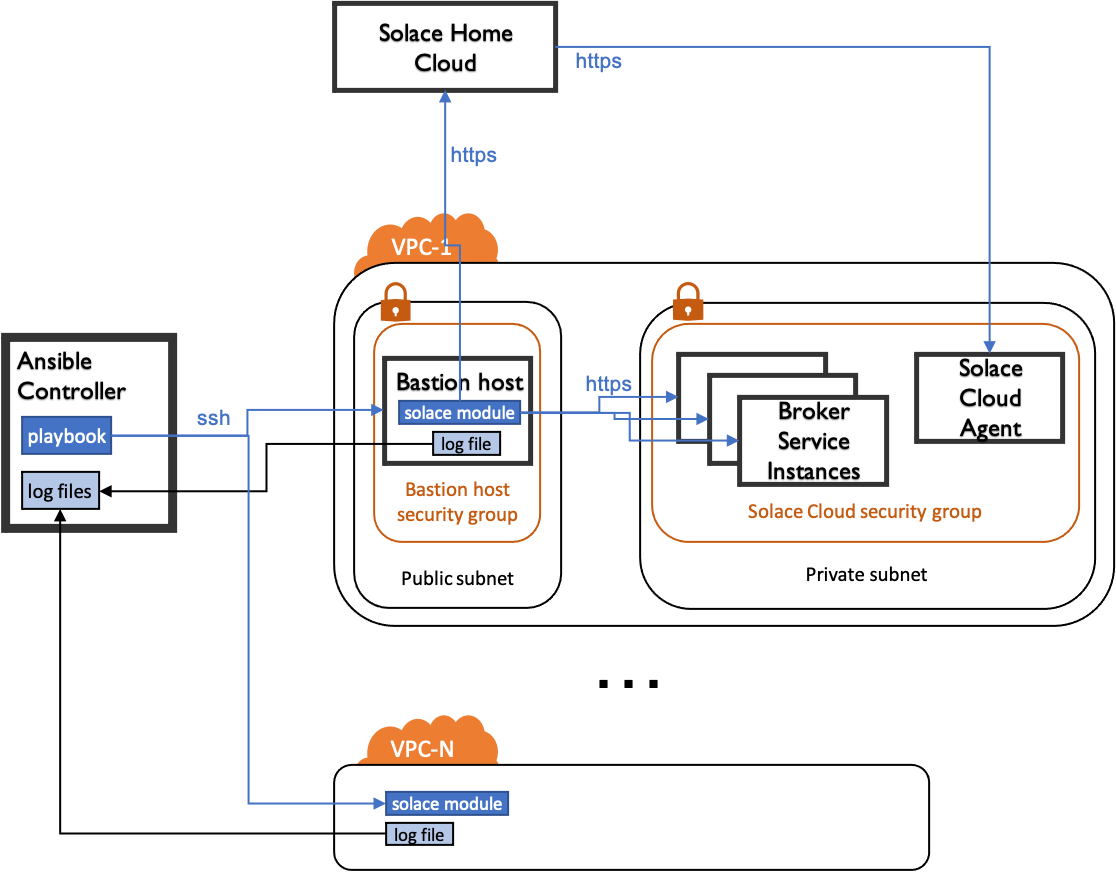
Figure 2: Setup with Broker Services managed by Solace Cloud
Setting up the Bastion Host
The Ansible scripts are executed on the Bastion Host. It therefor needs to be setup with the following:
Python 3 (upgrade pip3 as well)
Python dependencies
requirements:
requests>=2.25.0
xmltodict>=0.12.0
docker-compose
Note: there is no need to install Ansible or Ansible Solace Collection on the Bastion Host.
Inventory & Playbook Example
Consider the following inventory file that describes two Bastion Hosts with two Broker Service Instances:
---
all:
  hosts:
    broker-service-1:
      # args for the bastion host
      ansible_become: true
      ansible_host: {ip-address-of-bastion-host-vpc-1}
      ansible_python_interpreter: /usr/bin/python3
      ansible_user: {ansible-user-on-bastion-host}
      ansible_solace_log_base_path: /var/local
      # args for the solace modules
      broker_type: solace_cloud
      sempv2_host: {fqdns-or-ip-of-semp-service-of-broker-service}
      sempv2_is_secure_connection: true
      sempv2_password: {password}
      sempv2_port: 943
      sempv2_timeout: '60'
      sempv2_username: {username}
      solace_cloud_service_id: {the-service-id}
      virtual_router: primary
      vpn: broker-service-1
    broker-service-2:
      # args for the bastion host
      ansible_become: true
      ansible_host: {ip-address-of-bastion-host-vpc-2}
      ansible_python_interpreter: /usr/bin/python3
      ansible_user: {ansible-user-on-bastion-host}
      ansible_solace_log_base_path: /var/local
      # args for the solace modules
      broker_type: solace_cloud
      sempv2_host: {fqdns-or-ip-of-semp-service-of-broker-service}
      sempv2_is_secure_connection: true
      sempv2_password: {password}
      sempv2_port: 943
      sempv2_timeout: '60'
      sempv2_username: {username}
      solace_cloud_service_id: {the-service-id}
      virtual_router: primary
      vpn: broker-service-2
The following playbook will create a the same queue on both Broker Service Instance in both VPCs.
It also shows an example of how to fetch the log files from the Bastion Hosts back to the Ansible Controller regardless of success or error using an Ansible handler.
hosts: all
gather_facts: yes
any_errors_fatal: true
collections:
  - solace.pubsub_plus
module_defaults:
  # ... define additional module defaults
  solace_queue:
    host: "{{ sempv2_host }}"
    port: "{{ sempv2_port }}"
    secure_connection: "{{ sempv2_is_secure_connection }}"
    username: "{{ sempv2_username }}"
    password: "{{ sempv2_password }}"
    timeout: "{{ sempv2_timeout }}"
    msg_vpn: "{{ vpn }}"
vars:
    # adding the inventory_hostname to log file.
    # resulting in: /var/local/my-solace-cloud-service.ansible-solace.log
    remote_ansible_solace_log_path: "{{ ansible_solace_log_base_path }}/{{ inventory_hostname }}.ansible-solace.log"
environment:
  # set the environment for the playbook to enable logging
  ANSIBLE_SOLACE_ENABLE_LOGGING: true
  ANSIBLE_SOLACE_LOG_PATH: "{{ remote_ansible_solace_log_path }}"
handlers:
  # define a handler to retrieve the log file to the ansible controller vm
- name: Bring back the log file
  fetch:
    src: "{{ remote_ansible_solace_log_path }}"
    # variable set when calling the playbook. NOTE the '/' at the end!
    dest: "{{ ANSIBLE_SOLACE_LOCAL_LOG_BASE_PATH }}/"
    flat: yes
  listen: log-file-handler
  no_log: true
tasks:
  # ensure the handler is notified at least once
- name: Set up Handler
  debug:
    msg: setup handler
  changed_when: true
  notify: log-file-handler
- name: Delete Log file
  file:
    path: "{{ remote_ansible_solace_log_path }}"
    state: absent

- name: Block of ansible-solace tasks
  block:
  - name: Create Queue
    solace_queue:
      name: my-queue
      state: present
  always:
    # ensure handlers are called no matter if a task inside the block fails or not
    - meta: flush_handlers